Cyberbullying is harming or harassing someone on purpose using ICT. A girl sends text messages every day to another girl calling them ugly and threatening to hurt them unless they buy them things.
Social networking privacy threat is putting personal info on a social network without controlling who can see it. An example includes a little boy posting some of his personal info thinking that it would hbe okay and then a group of people show up at the house armed with weapons (bit extreme but not entirely uncommon).
An Inappropriate contact could be someone who sends inappropriate messages and photos. An example is that a 14 year old boy went on line and got sent inappropriate content.
Inappropriate content is inappropriate videos, pictures and messaages. An example is that a young boy accidentally sees a scary violent image when searching the Internet for images of knives for his Food Technology homework.
Bias is incorrect info on a topic.
Online hate is a type of speech that takes place online with the intention of attacking a person based on their protected characteristics.
Digital footprint
With someone’s digital footprint, you could find out about their true personality, location and address. You can also find out info on their personal life and their family. Stuff you post online can stay forevere until the person who shared the info or an admin takes it down. Employers could want to trace your digital footprint as part of a background check. They might want to trace someone’s digital footprint to be able to see your personality, no matter how old they, are, and this can be used against you when looking for a career. Two steps you could take to manage your digital footprint is to be on top of your privacy settings and to use social media safely.
Problem solving:
4 stages of problem solving for computer scientists:
Understand the problem – The ‘define and analysis’ stage; often using computational thinking skills: decomposition, abstraction, pattern recognition.
Devise a plan — Examine the possible solutions
Carry out the plan – Use algorithmic thinking to create a step-by-step, structured solution. Consider the problem’s inputs/outputs, the data and processing of data; the sequence of each task/step.
Carry out the plan – Use algorithmic thinking to create a step-by-step, structured solution. Consider the problem’s inputs/outputs, the data and processing of data; the sequence of each task/step.
Computational thinking concepts:
Logic is factual things.
Testing algorithms is testing methods and ways how things work and planning solutions for problems and projects.
Decomposition is breaking down a system and a problem down making it easier to understand.
Patterns are very similar to algorithms except the whole piece of code would take forever to finish meaning it could go on forever.
Abstraction is used to simplify code into different functions.
Evaluation is assessing the work to see quality
Lateral thinking is when you use creative ideas to come up with a solution.
Generalisation is making a group by using the same solution in the same problem.
Computational thinking approaches:
Tinkering is exploring ways that could work in the problem and then choosing the most appropriate option.
Creating algorithms in computing helps the reader understand the program that was planned understood better.
Debugging is the way to fix ‘bugs’ in a computer program. This is done by taking out the bugs and fixing them by replacing them with new code.
Resilience is needed because if the problem does not get fixed you need to keep trying.
Collaboration is working on a project with another colleague because the project might take too long.
Top-down is when you start with the abstract and continue until you find the specific.
Bottom-up is solving small problems first.
Trial and error explain itself in its name – you keep trying until you succeed.
Key terms for problem solving
Logical thinking – It's jus using logic to plan and assume things that require basic facts and info which is a bit similar to generalisation.
Analysis – Examining and identifying the facts that contribute to a huge problem.
Implementation – Put into action a planned, structured solution and plan a plan and simplify it for yourself.
Decomposition – Break down a problem into sub-problems.
Abstraction – Removing unnecessary details not needed to solve the problem or sub-problem.
Pattern recognition – Finding repetitions in the problem.
Programming Concepts:
Key terms:
Algorithm – A process or set of rules to be followed in calculations or other problem solving operations, especially by a computer.
Program – To program an application or a website, you give the computer code to carry out the instructions you have given to it.
Sequence – A sequence is a particular order in which things are arranged.
Selection – A selection is something/some things someone has picked.
Iteration – An adaptation or more commonly known as an update in the software/hardware you are programming.
Variable – Something that is changed in a software or hardware.
Variable identifier – This detects whether there is a variable or not.
Variable assignment – Something that immediately changes the value of the variable.
Assignment operator – Arithmetic operators that come in () - = + / *.
Boolean expression – Boolean expressions determine whether something is true or false.
Input – Input is something you tell the computer to do.
Output – The outcome of the input.
Flow chart – This is a diagram that depicts the process.
Pseudocode – A fake programming language.
Control flow – The order in which a type of program is carried out.
Concatenate – Linking things together in a chain/series.
Fun fact: The difference between an algorithm and a program is that an algorithm is a step-by-step set of instructions to solve a problem, while a program is a coded implementation of one or more algorithms that a computer can execute
Flow diagrams
Terminator: shows the start or end of a procedure.
Data: Shows data input to a system or procedure. Shows data output from a system or procedure.
Decision: Decision symbol allows a process to select one of two paths for the process to continue. The system can choose a different path.
Subrooting: 'Control' passes to a predefined process within a system. When that sub procedure has come to the end, control then passes back the calling sub process block.
Line: Line connects the symbols to indicate the flow off data through a system.
Variables:
What is a variable?: A variable is a piece of data that is able to be changed. A variable identifier is a way that variables are identified. Variable identifiers are needed in computing because you do now want two to have the same name. Don’t use functions as variable names. Use one easy to understand and remember. No use if you do not know what will be stored in the variables. No spaces. No captials in the first letter. Underscores are allowed.
Comparison operators:
Comparison operators are operators used for comparing two variables, mainly used in boolean in if statements. > Is more than. < Is less than. = Is equal to. != Is not equal to. >=Greater or equal to. <= Less than or equal to.
Iteration:
Iteration in programming is just lines in programs that are repeated. The term ‘infinite loop’ means that the program is repeated forever while the program is running. A counter-controlledd loop has a ‘counter’ which counts how much times a sequence is repeated in a counter-controlled loop. A condition in a condition controlled loop is something that has to be met for the condition controlled loop to work. It is a boolean expression.
Data representation — Numbers
Binary is the way all computers think. Decode means when something is simplified. Decode is when something returns back to its original state. To encode a binary number, you convert from denary to binary, but to decode a binary number, you convert from binary to denary. To encode text, you could use ASCII.
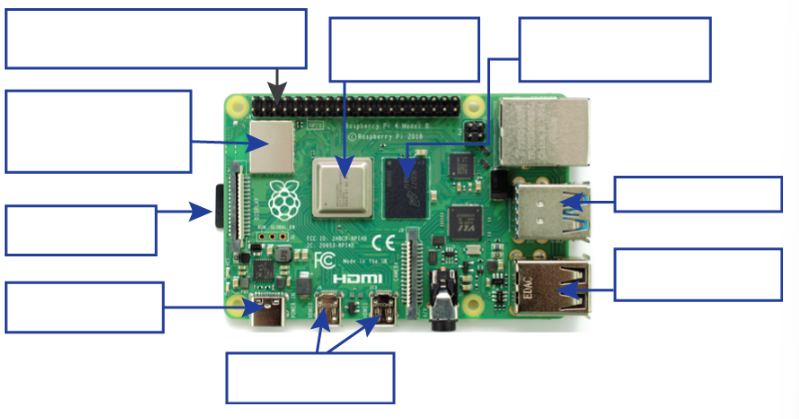
Raspberry Pi:
Parts:
Starting form the top-left box clockwise, there are:
40-pin GPIO
ARM Chip Processor
RAM
USB Type A 3.0
USB Type A 2.0
2 Micro HDMI ports
USB Type C power port
Micro-SD card
Bluetooth and Wi-Fi module
There is many things you could do with a Raspberry Pi. The sky's the limit. For more information, check your OneNote.
How does technology help people?
Technology has done many things for us, helping us in our day to day activities. Could you imagine a life without electricity in 2025?
The Internet of Things (IoT)
The actual technology in programs and appliances is hidden away to make it seem much more natural. The internet is the connection between devices across the network. The internet of things is the collective network of devices connected through the internet. It enables data transfer between computers without human interaction. Everyone who has something ‘smart’ in their home uses IoT.